

What a Capacitive Touchscreen Detects When You Tap

What a Capacitive Touchscreen Detects When You Tap
TECHNOLOGY EXPLAINED
A capacitive touchscreen does not need to feel a push. It detects a tiny change in an electrical measurement beneath the glass, then works out where that change happened. The glass is an insulator, but the electric field from the sensor can still interact with a finger through it.
Visual note: the three diagrams in this article are AI-generated illustrations by the OnelROR Editorial Team.
What changes when a finger gets close?
Capacitance describes how much electric charge a system can store. In a touch panel, conductive sensor electrodes sit under a protective cover. A controller measures their electrical behavior when nothing is touching the screen, creating a baseline. When a finger approaches, the body couples electrically to the sensor through the insulating cover. That changes the measured capacitance by a very small amount.
The finger is not sending a name or a signal like a radio tag. The sensor simply sees that the field around one part of its panel has changed. Texas Instruments’ guide to capacitive sensing explains that an insulating overlay acts as a dielectric between the user and an electrode, while the user’s touch adds capacitance to the measurement.
A grid turns the change into a location
One common touchscreen design uses mutual capacitance. It has two sets of electrodes: X lines that transmit electrical pulses and Y lines that receive them. Each crossing is a sensor node. The controller samples those nodes and compares the readings with their no-touch baselines.
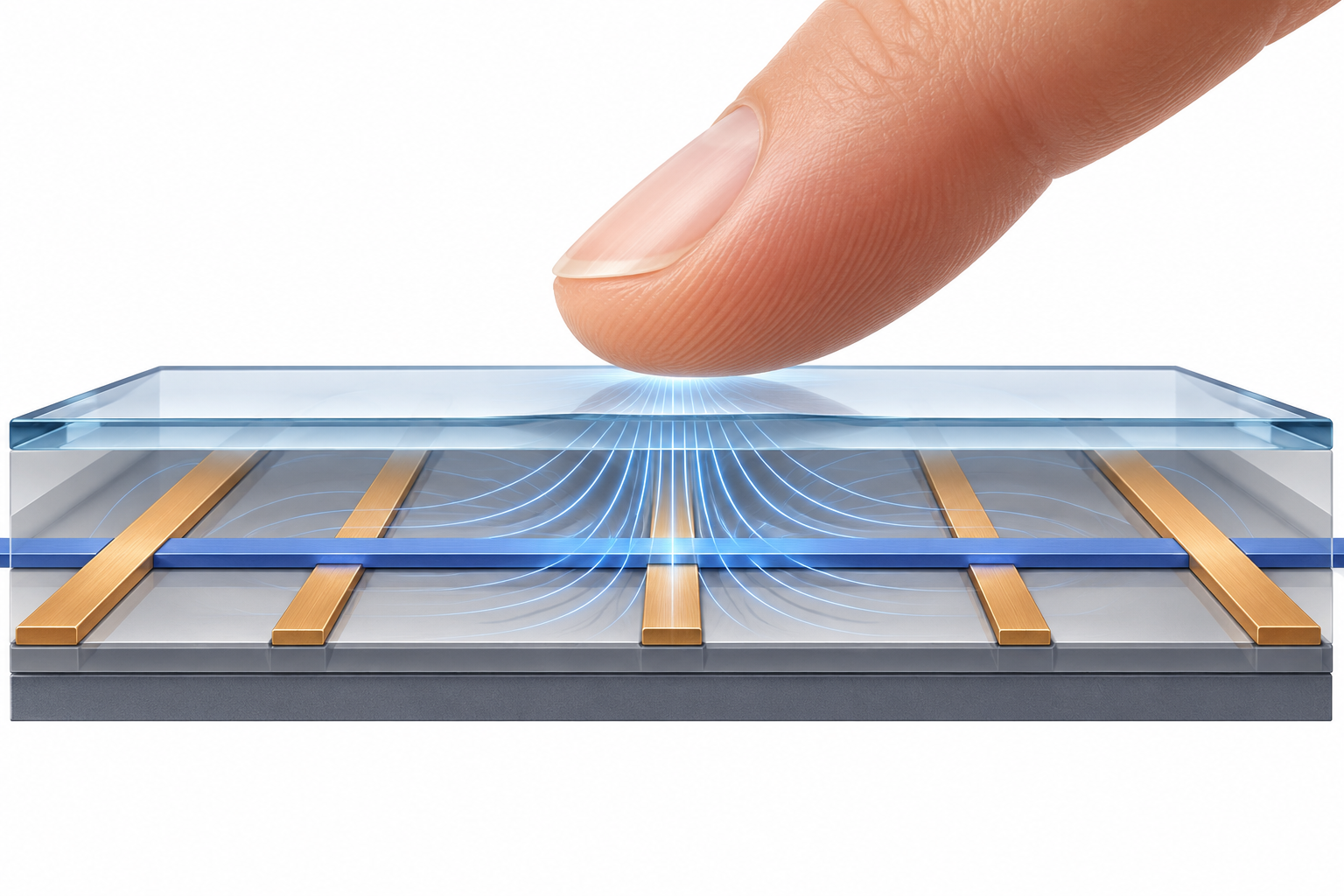
When a finger touches the cover, it changes the electric-field coupling between the X and Y electrodes. A finger can add direct coupling, but it also offers an alternate path for some charge; Microchip’s guide explains that for a real touch the second effect normally dominates, so a mutual-capacitance sensor reads an apparent reduction in coupling. The controller finds the pattern of changed nodes and calculates an X–Y position for the touch. Move your finger, and the pattern shifts; touch two places, and a suitable sensor grid can track two locations.
Not every capacitive sensor measures the same way
In self-capacitance sensing, the controller measures one electrode against ground instead of measuring a pair of electrodes. A touch generally increases that electrode’s measured capacitance. Microchip documents both methods and notes that a two-dimensional touchscreen can use an X–Y matrix; designers choose sensor arrangements and controller techniques to suit the panel.
That distinction explains why “capacitive” describes a family of sensing methods, not one identical circuit in every device. The useful idea is the same: the controller repeatedly measures a small electrical property and treats a change above its threshold as a touch.

Why gloves can make taps harder
A thick or insulating layer between a finger and the sensor can weaken the interaction, so ordinary gloves may not register reliably. The result depends on the cover, sensor design, controller settings, and glove material; some gloves add conductive material at the fingertips to improve coupling. This is a practical consequence of the same design trade-off described in Microchip’s touchscreen guide: the cover material and sensor geometry affect the touch signal.
The short version: the screen does not sense pressure through glass. Its electrode pattern measures how a nearby finger changes capacitance, and the controller turns that change into a location.