

How to Read a Nutrition Facts Label: Serving Size, Calories, and %DV
Everyday Guide
How to Read a Nutrition Facts Label: Serving Size, Calories, and %DV
Nutrition Facts labels turn a long list of numbers into a quick reference—but only if you know what each number describes. Start with the serving size, then read calories and nutrients in the context of how much you actually eat. This guide explains the standard U.S. label without treating it as a score or a substitute for personal medical advice.
By OnelROR Editorial Team
October 23, 2026 · 5-minute read
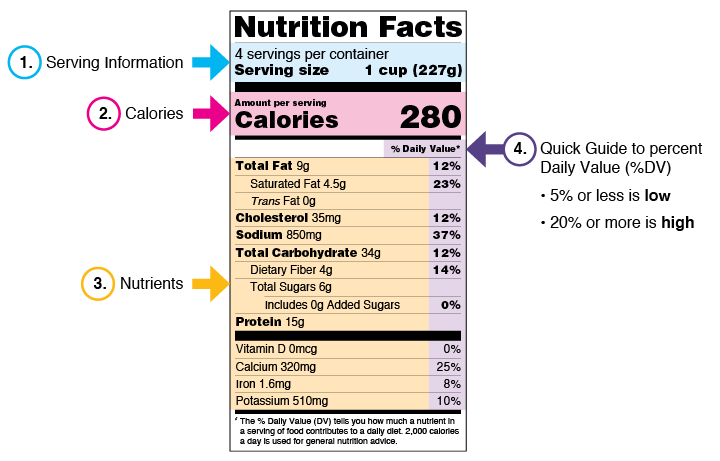
FDA educational example for frozen lasagna; values are sample data. Colors highlight teaching points and do not appear on packaged labels. Credit: U.S. Food and Drug Administration (FDA). Reproduced October 23, 2026. Original FDA source.
1. Begin at the top: servings and serving size
The first lines tell you the number of servings in the package and the amount counted as one serving. A serving size is based on the amount people typically eat or drink; it is not a recommendation for how much you should have. It is usually written as a familiar measure—such as a cup, slice, or piece—followed by a metric amount in grams or milliliters.
Every number below it, including calories, refers to that stated serving unless the label clearly says otherwise. In the FDA’s lasagna example, one serving is one cup. If you eat two cups, you have eaten two servings, so the listed calories and nutrient amounts double. This simple check prevents a small-looking per-serving number from being mistaken for the amount in the whole container.
2. Match the label to the portion you eat
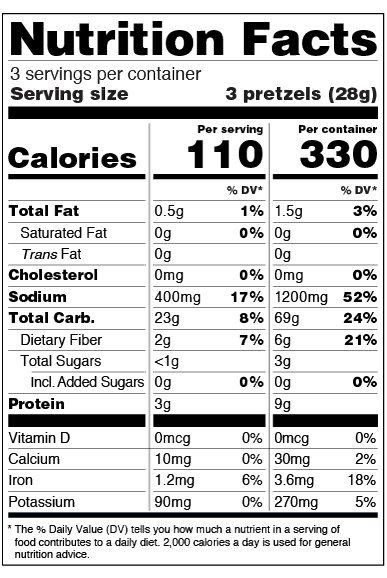
Before comparing two products, check that you are comparing like amounts. If one label reports a serving in grams and another uses pieces, use the metric weight or a common household measure to make the portions comparable. A package may contain several servings even when it looks like one snack or one meal. For certain packages that could be eaten in one sitting, a dual-column label can show both one serving and the entire package; use the column that matches what you want to understand.
To scale a label for a different amount, multiply the listed values by the number of servings. For example, eating one and a half servings means multiplying each listed calorie, gram, milligram, and %DV amount by 1.5. This is arithmetic for interpreting the label, not a judgment about whether that portion is right for you.
3. Read calories as an amount per serving
The calorie line estimates the energy in one serving. First settle the serving-size question; otherwise the calorie figure is easy to misread. If you eat two servings, the calories are twice the listed per-serving amount. FDA materials use 2,000 calories a day as a general reference for nutrition advice, but individual energy needs vary. Treat that reference as context, not as a personal target calculated for you.
4. Use %DV as a quick comparison guide
The percent Daily Value (%DV) shows how much a nutrient in one serving contributes to a daily reference amount. It puts nutrients measured in different units on one scale, so you do not need to calculate a percentage from the grams or milligrams yourself. The %DV column does not need to add up to 100%; each entry describes one nutrient separately.
FDA’s general guide is 5% DV or less per serving for a low amount and 20% DV or more for a high amount. These are quick guideposts, not a complete description of a food or a personalized diet plan. When comparing similar foods, compare the same serving size and use the %DV for the nutrients that matter to your own needs. FDA commonly highlights dietary fiber, vitamin D, calcium, iron, and potassium as nutrients to get more of, and saturated fat, sodium, and added sugars as nutrients to limit.
5. Know what the sugar lines—and missing %DV—mean
Total Sugars includes sugars naturally present in foods such as fruit and milk, plus any added sugars in the product. “Includes” before the Added Sugars line means those added sugars are already part of the Total Sugars amount; do not add the two gram figures together as though they were separate totals. Total Sugars has no %DV. Added Sugars has grams and a %DV on labels that declare it.
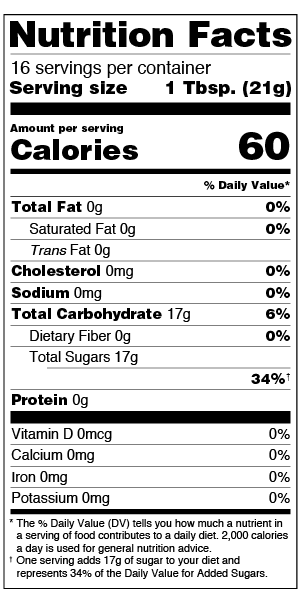
Trans fat and Total Sugars also have no %DV. Protein generally has no %DV on labels for the general population unless a qualifying condition applies, such as a protein claim. In those rows, the number of grams is still there to read and compare. A missing %DV is not a zero amount; it means that column is not provided for that nutrient.
A quick label-reading routine
- Check servings per container and serving size.
- Decide how many servings match the portion you will eat.
- Scale calories and nutrient amounts if the portion differs.
- Use %DV to compare similar foods with the same serving size.
- Read Total Sugars and Added Sugars as related lines, not separate totals.
That order keeps the figures in context. If you need advice tailored to a health condition, medication, or personal nutrition goal, ask a qualified health professional rather than trying to infer it from a label alone.
Sources and image credits
- FDA: How to Understand and Use the Nutrition Facts Label (page current as of March 5, 2024).
- FDA: Serving Size on the Nutrition Facts Label.
- FDA: The Lows and Highs of Percent Daily Value.
- FDA: Added Sugars on the Nutrition Facts Label.
- Images: FDA label graphics from the pages above. FDA’s website policy says FDA website text and graphics may generally be republished unless otherwise noted; source credit is appreciated. This article is independent and does not imply FDA endorsement.